 SuanSupply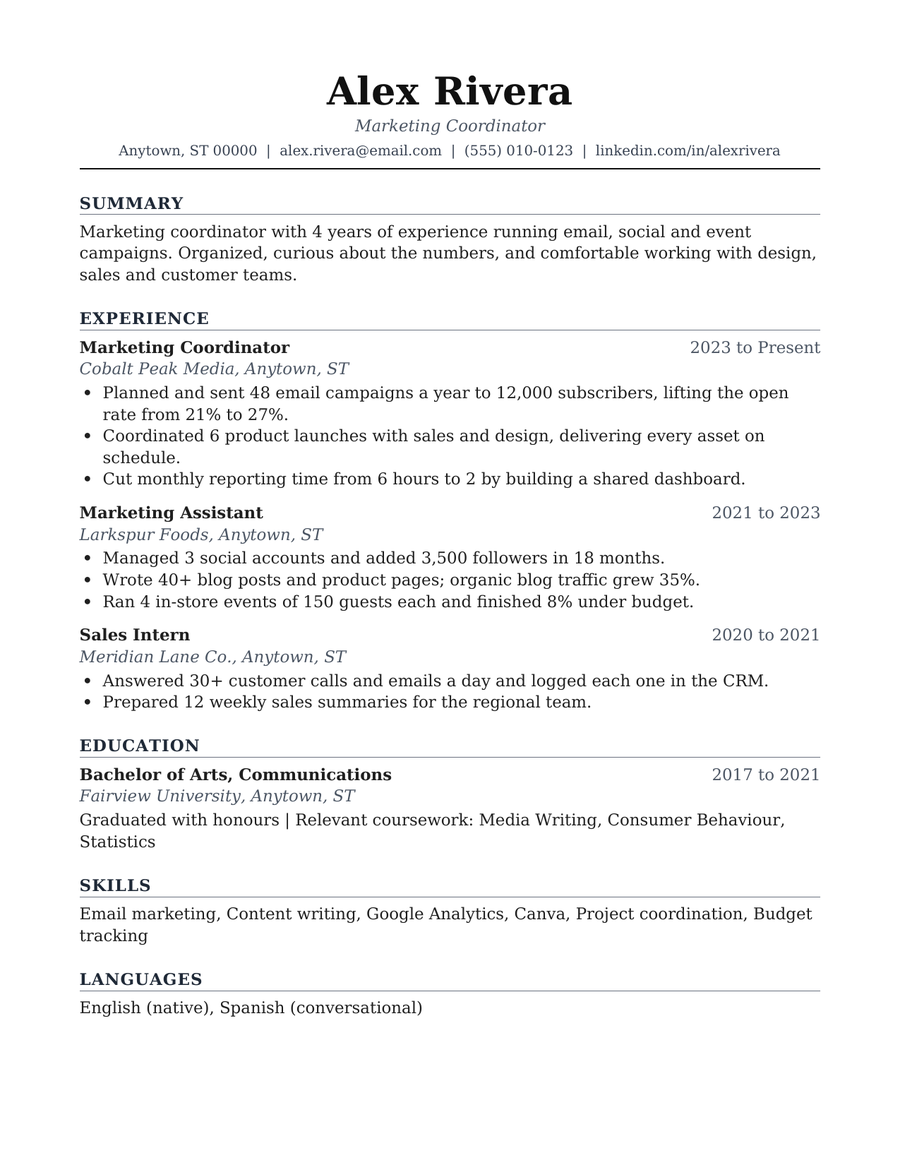
How do you open the resume template in Google Docs?
- Download the .docx fileUse the buttons above for the resume, the cover letter or both.
- Upload it to Google DriveGo to drive.google.com and click New > File upload, then pick the file.
- Open it with Google DocsRight-click the file and choose Open with > Google Docs. Google makes an editable copy.
- Replace the sample textType over the example name, jobs and dates. The headings and spacing stay in place.
- Download it as a PDFChoose File > Download > PDF document and send that file, unless the job asks for Word.
What's in the resume template?
- A name header with job title, location, email, phone and LinkedIn
- Summary, Experience, Education, Skills and Languages sections, with dates aligned to the right
- Example bullet points that show results, so you can see the style before you write your own
- A matching cover letter with the same header, a greeting, three short paragraphs and a sign-off
- No photo, no tables and no text boxes
How do you make a resume pass applicant tracking systems?
- Keep one column. Text in side columns, tables or text boxes can come out jumbled when a system reads it.
- Use standard headings. 'Experience', 'Education' and 'Skills' are what systems and recruiters look for.
- Mirror the job posting. Use the same words for skills and tools that the ad uses, where they're true for you.
- Keep contact details in the body. Don't put your email or phone in the page header or footer.
- Show results, not duties. Start bullets with a verb and add a number when you have a real one.
- Name the file clearly. For example firstname-lastname-resume.pdf.
Want the full resume template?
Our full Resume Template on Etsy builds on this free version. Pay once, edit it in Google Docs or Word, and reuse it for every application.
Frequently asked questions
Is the resume template free?
Yes. Both the resume and the cover letter are free to download and use, with no sign-up and no email.
How do I open a Word resume template in Google Docs?
Download the .docx file, go to Google Drive, click New > File upload and pick the file. Then right-click it and choose Open with > Google Docs.
Is this resume template ATS friendly?
It's built the way applicant tracking systems read best: one column, real heading styles, plain text with no tables, text boxes or images. Always check the job posting in case it asks for a specific format.
Should I send my resume as a PDF or a Word file?
Send a PDF unless the job posting asks for Word. In Google Docs, choose File > Download > PDF document.
Does the template include a photo?
No. Many employers in the US and Canada prefer resumes without a photo, and a photo adds nothing an applicant tracking system can read.
What paper size is the resume?
The English template is US Letter. To switch to A4 in Google Docs, choose File > Page setup and change the paper size.
The names, companies and numbers in the template are made up. Google Docs and Microsoft Word are trademarks of their owners; SuanSupply isn't affiliated with Google or Microsoft.