 SuanSupply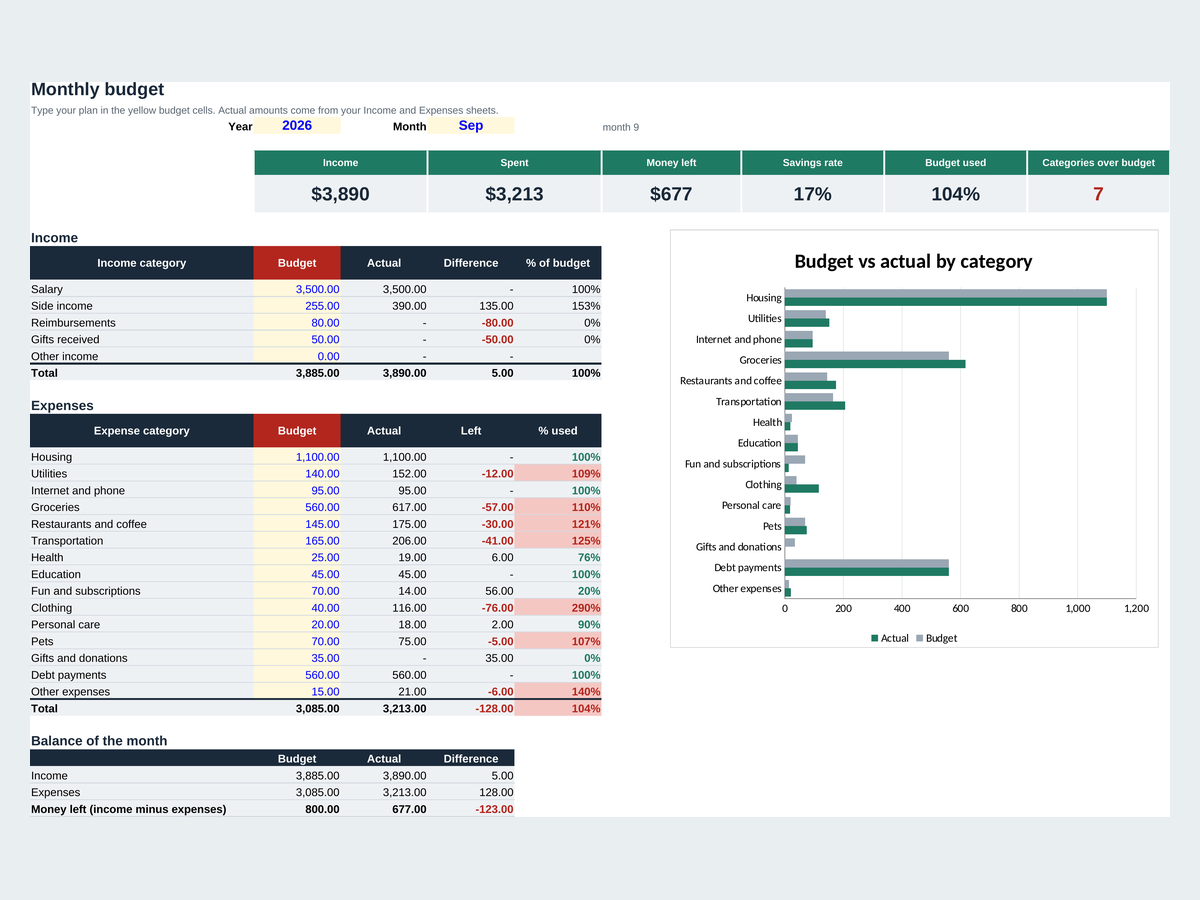
What's in the free personal budget spreadsheet?
- Income and Expenses logs: date, category (dropdown), description and amount, plus payment method for expenses
- Month sheet: pick a year and month, type your budget per category and see actual, what's left and % used
- Income, spent, money left, savings rate and the number of categories over budget at the top
- A budget vs actual chart by category
- Settings: rename the categories and payment methods and set your currency symbol
What's the difference between the free and the full version?
| What you get | Free version | Full version on Etsy |
|---|---|---|
| Income and expense logs | 200 income, 500 expenses | 500 income, 2,000 expenses |
| Monthly budget vs actual | Yes | Yes |
| 12-month overview with charts | No | Yes |
| Savings goals | No | Up to 8 |
| Debt payoff tracker | No | Up to 8 debts |
| Languages | One file per language | English and Spanish files |
How do you make a budget with this spreadsheet?
- Set your categoriesOn Settings, rename the categories to fit your life and type your currency symbol.
- Type your budgetOn Month, type how much you plan to spend in each category.
- Log as you goEach time you get paid or spend, add a row to Income or Expenses.
- Check the monthOpen Month to see what's left in each category and where you went over.
How do you open it in Google Sheets?
Go to sheets.google.com, choose File > Import > Upload, pick the file and choose Replace spreadsheet (or Create new spreadsheet). The formulas, dropdowns and charts keep working. In Microsoft Excel, just double-click the file.
Type only in the cells with red headers and light yellow fill. Grey cells hold formulas, so leave them alone, and clear the example data by deleting cell contents, not whole rows.
Want the full year, savings goals and a debt plan?
Our full Personal Budget spreadsheet adds a 12-month overview with charts, up to 8 savings goals and a debt payoff tracker, with English and Spanish files. Pay once on Etsy, no subscription.
Frequently asked questions
Is the personal budget spreadsheet really free?
Yes. Download the .xlsx file and use it as long as you like, with no sign-up and no email.
Does it work in Google Sheets?
Yes. In Google Sheets choose File > Import > Upload, pick the file and choose Replace spreadsheet. The formulas, dropdowns and charts keep working.
Can I change the budget categories?
Yes. Rename them on the Settings sheet and the dropdowns and the Month sheet update with them.
What's the difference from the budget template for Google Sheets?
Both work in Excel and Google Sheets. This one logs income and expenses on separate sheets with payment methods; the Google Sheets budget template plans income sources and spending categories on a Setup sheet and logs both on one Transactions sheet.
Is this financial advice?
No. The spreadsheet helps you organize your money. It isn't financial or tax advice.
The example data in the file is made up. This template helps you organize your money; it isn't financial or tax advice. Microsoft Excel and Google Sheets are trademarks of their owners; SuanSupply isn't affiliated with Microsoft or Google.