 SuanSupply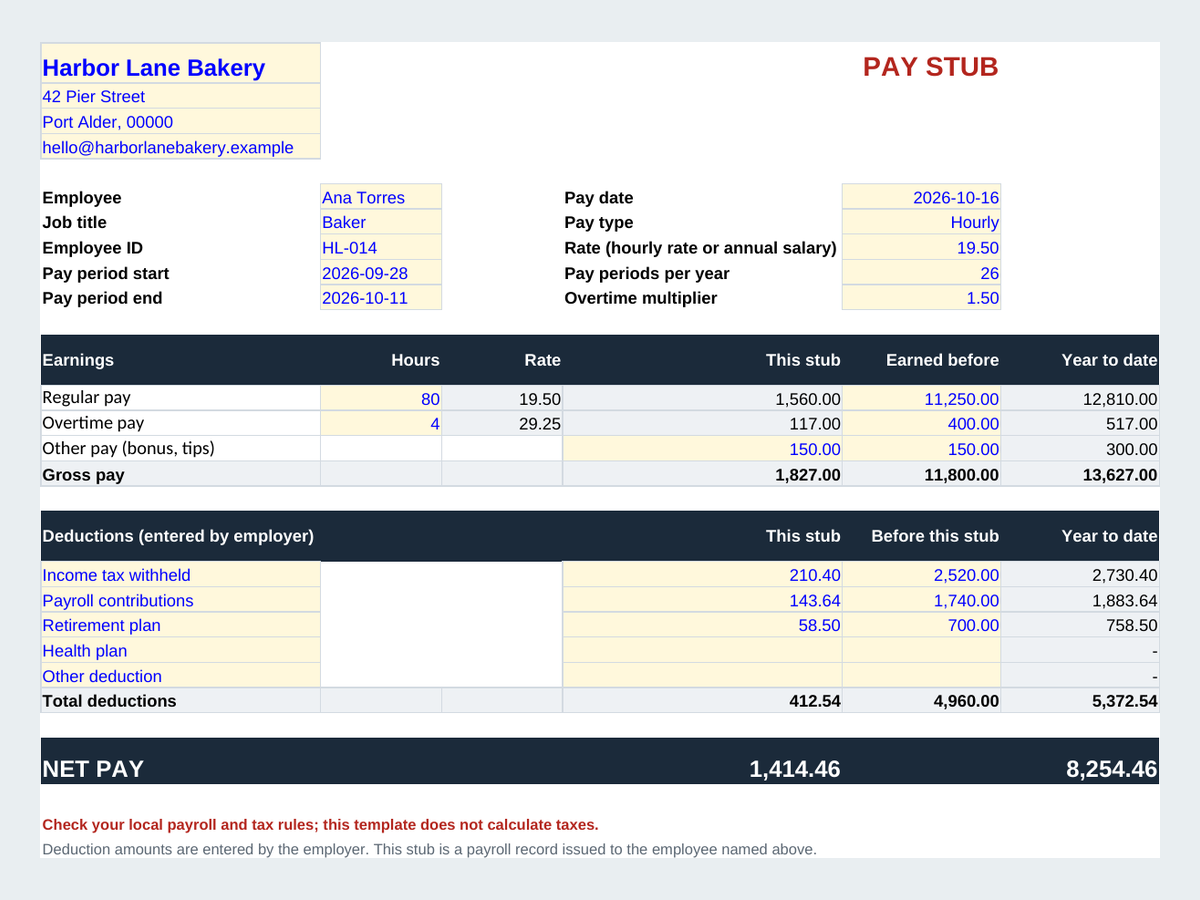
What's on the free pay stub template?
- Business name and address, employee, job title, employee ID, pay date and pay period
- Hourly (hours x rate) or salary (annual salary divided by pay periods per year)
- Overtime with your own multiplier, plus other pay such as a bonus or tips
- 5 deduction lines with the amounts you enter, and net pay
- This stub, earned before and year to date columns
What's the difference between the free and the full version?
| What you get | Free version | Full version on Etsy |
|---|---|---|
| Printable pay stub | One stub, filled in by hand | Any employee and pay date from dropdowns |
| Employee list | No | 30 employees |
| Pay run log | No | 500 pay runs |
| Year to date totals | Typed in | Calculated from the log |
| Tax calculation | No | No |
| Languages | One file per language | English and Spanish files |
How do you fill in the pay stub?
- Add your businessType your business name, address and contact at the top.
- Fill in the employee and periodType the employee, pay date, pay period, pay type and rate or annual salary.
- Enter hours and deductionsType regular and overtime hours, other pay, and the deduction amounts you withhold under your local rules.
- Print itFile > Print, portrait, fit to 1 page wide. Keep a copy for your payroll records.
How do you open it in Google Sheets?
Go to sheets.google.com, choose File > Import > Upload, pick the file and choose Replace spreadsheet (or Create new spreadsheet). The formulas, dropdowns and charts keep working. In Microsoft Excel, just double-click the file.
This template doesn't calculate taxes. Tax and deduction amounts are typed in by the employer, and the sheet only adds and subtracts the numbers you enter. Check your local payroll and tax rules, or ask your accountant, for the right amounts.
Run payroll for your whole team
Our full Pay Stub Template for Small Employers adds an employee list, a pay run log with year to date totals that add up by themselves, and a stub for any employee and pay date from a dropdown. Pay once on Etsy, no subscription.
Frequently asked questions
Is the pay stub template really free?
Yes. Download the .xlsx file and use it as long as you like, with no sign-up and no email.
Does the template calculate taxes?
No. You type the tax and deduction amounts you withhold, and the sheet adds and subtracts them. Check your local payroll and tax rules for the right amounts.
Who is this pay stub template for?
Small employers who pay their own staff, such as a bakery, a cleaning business or a household employer, and want a clear record for each pay period.
Can I use it for salaried employees?
Yes. Choose Salary as the pay type and type the annual salary and the number of pay periods per year; the stub divides it for you.
Does it work in Google Sheets?
Yes. In Google Sheets choose File > Import > Upload, pick the file and choose Replace spreadsheet. The formulas, dropdowns and charts keep working.
Is this legal or tax advice?
No. It's a payroll record template, not legal, tax or accounting advice.
Example names and numbers in the file are invented. A payroll record template for employers issuing stubs to their own staff; it doesn't calculate taxes and isn't legal, tax or accounting advice. Microsoft Excel and Google Sheets are trademarks of their owners; SuanSupply isn't affiliated with Microsoft or Google.